
Connect Claude, ChatGPT or another AI assistant
Let your own assistant look things up in IndieTower while you work.
If you already work with an AI assistant, you can give it read access to IndieTower. Then you can ask it things like “check the sleep sounds niche and list the top five competitors” without leaving your chat.
Open Connect your AI
Pick your assistant at the top: ChatGPT, Claude, Cursor, Claude Code, VS Code and others.
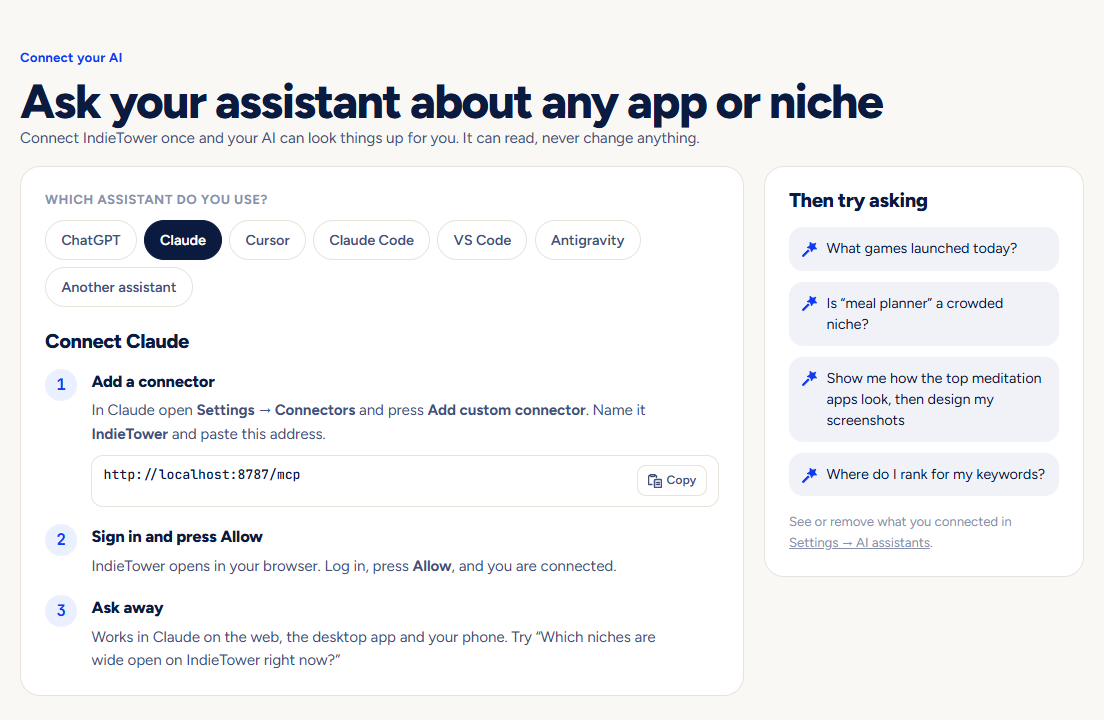
Follow the numbered steps
For Claude and ChatGPT you paste one address and sign in to IndieTower when asked. Cursor and VS Code have a one-click button. A few assistants need an access key, which the page makes for you.
Allow it
IndieTower asks “Let … read your IndieTower?”. Press Allow. You can disconnect it at any time under Settings → AI assistants.
Pictures show a demo account. The names and numbers in them are examples, not live data.
Next guidePlans, payments and cancellingHow to choose a plan, change it, cancel it and find your invoices.