
Improve your store page with Listing check
A score and a list of fixes for your title, subtitle, description and screenshots.
Your store page decides whether a search turns into a download. Listing check reads it the way the store does and tells you what to fix.
Pick your app and a country
Choose one of your tracked apps and press Check listing.
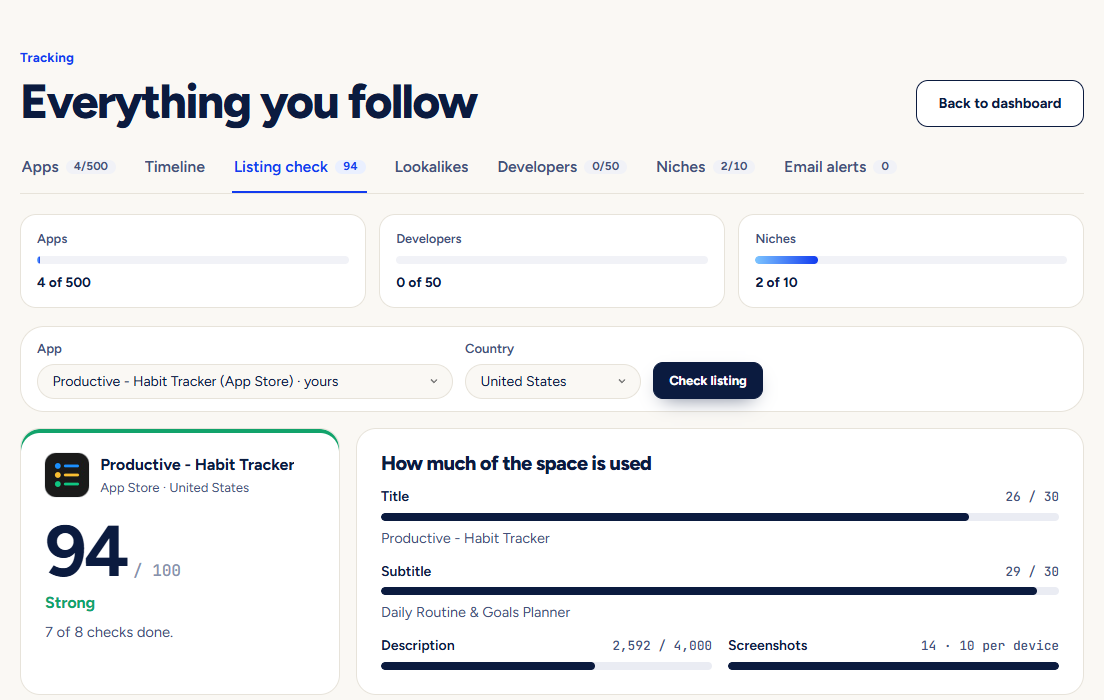
Read the checklist
Each line is one rule: how much of the title and subtitle space you use, which words the store can match, repeated words, description length, screenshots, how recently you updated, and whether the keywords you track for this app appear. Keywords you track for other apps or for niches you only study are left out.
Compare with competitors
For your own app the same check runs on its competitors, so you see where you are behind.
Let AI draft a better one
Press Write a better listing for up to three titles and subtitles, a keyword list for the App Store and a description opening, each inside the store’s character limits. Copy what you like.
Limits the check uses: an App Store title and subtitle hold 30 characters each; a Google Play title holds 30 and the short description 80.
Pictures show a demo account. The names and numbers in them are examples, not live data.
Next guideLookalike radar: when a new app looks like yoursGet told when a newly released app has a name, icon or screenshots close to your own.