
See every new app, day by day
Use Launches to browse what came out today, filter it and go back in time.
Launches is the heart of IndieTower: every app and game we found, on the day it was released. One day is shown at a time.
Pick a day
The page opens on today. Use the day picker at the top right to go back. A day with a lock is outside your plan’s history.
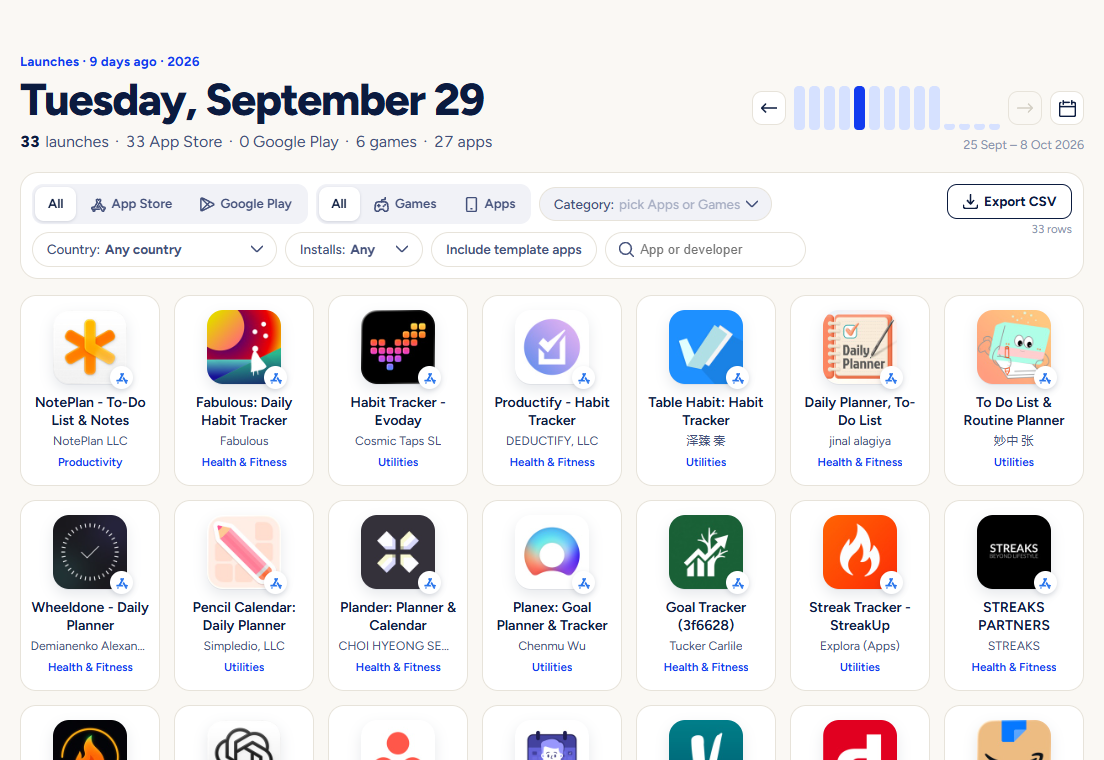
Filter
Choose a store, apps or games, a category and a country. Each choice applies at once. The country filter means “seen in that country’s store”.
Search inside the day
Type a word to keep only apps whose name, category or subtitle matches it.
Open an app
Click a tile for the app’s page: screenshots, versions, where it is available, chart history and, on paid plans, download estimates.
Good to know
- Days follow India time, so “today” starts at midnight in India.
- Apps from developers who mass-produce near-identical apps are hidden by default. The page tells you how many, with a link to show them.
- An amber tag marks a soft launch: an app released in only a few countries. What that means.
- Google Play apps can appear a little later than App Store apps, because Google publishes new apps more slowly.
- With the Indie plan you see 90 days of history and can press Export CSV to download the day on screen.
Pictures show a demo account. The names and numbers in them are examples, not live data.
Next guideSpot soft launches before they go worldwideFind the apps and games studios are quietly testing in a few countries.